Guides / Cost
Macropad and Numpad Cases: How to Make a Small Run Pay
October 22, 2026
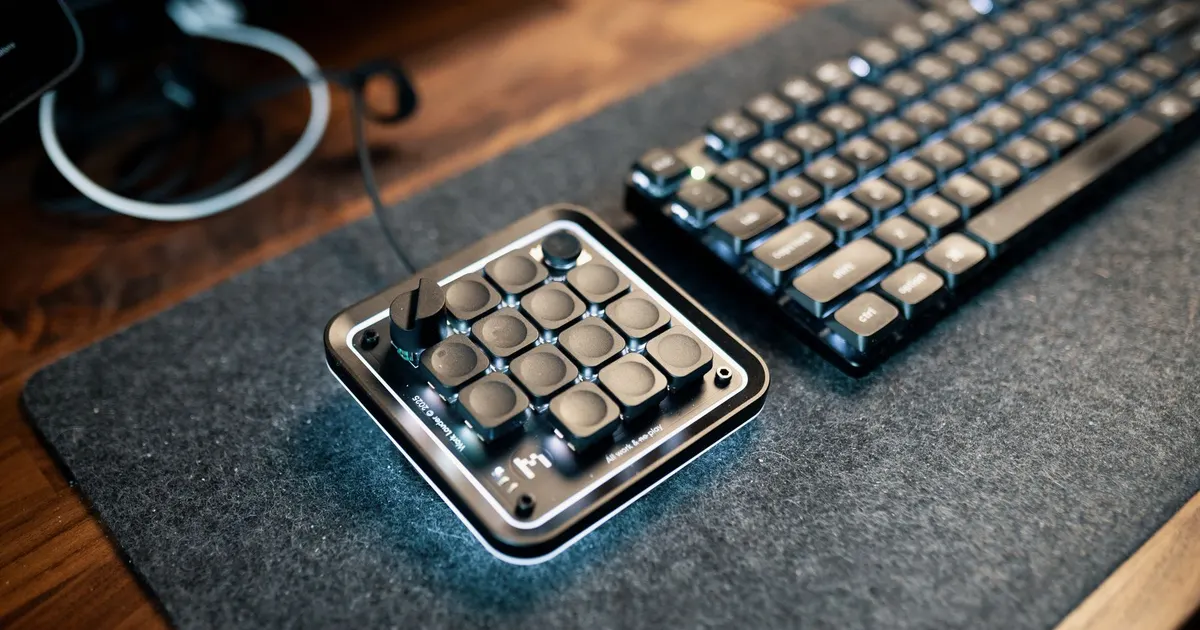
A macropad is a small keyboard with a handful of keys, used for shortcuts, streaming controls or creative software. A numpad is the number block of a full-size board, sold separately. Both are popular accessories, and both are small enough that designers assume the case must be cheap.
Per part, it often is. Per run, the numbers can still disappoint, because small parts have the same fixed costs as large ones. This guide shows where the fixed costs sit and how to design and plan a run so that they spread.
Why small parts are expensive per run
Every machined run has two kinds of cost.
- Fixed costs. Programming, proving the program, building the fixture, a first article and the minimum charge at the anodiser. They are the same whether the part is large or small.
- Run costs. Material, cutting time, deburring, blasting and handling. They grow with the number of parts and with their size.
For a large case, run costs dominate. For a small case, they are tiny, so fixed costs are the largest line and the price per part depends mostly on how many parts share them.
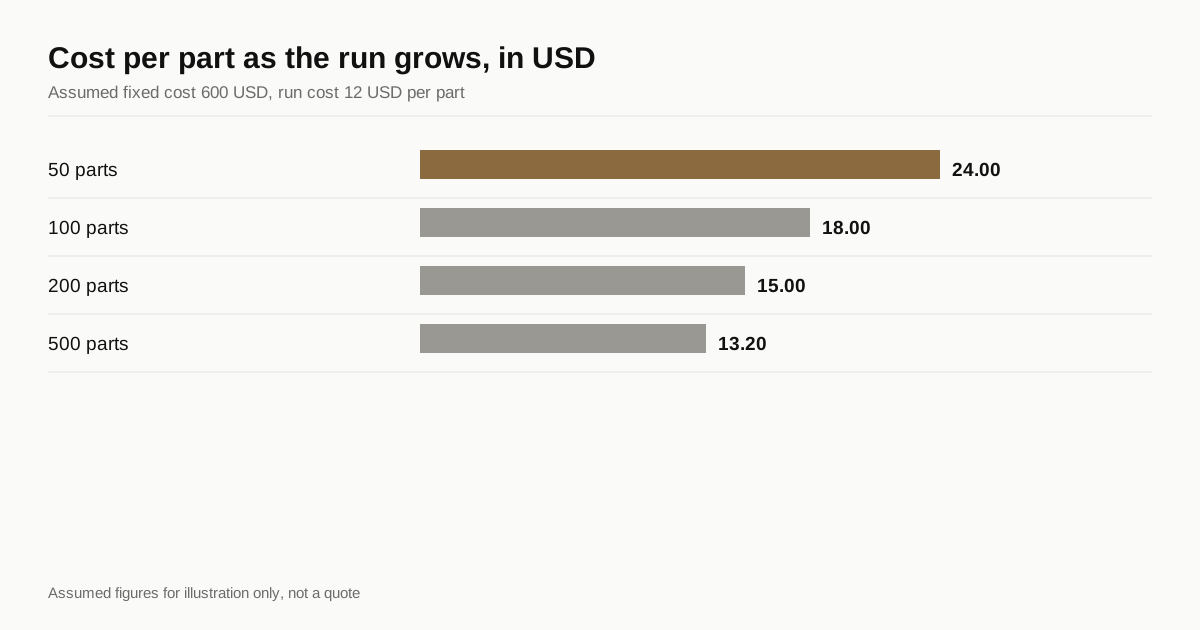
An illustration with assumed figures, not a quote: take a fixed cost of 600 USD and a run cost of 12 USD per part. The cost per part works out at 24 USD for 50 parts, 15 USD for 200 and about 13.20 USD for 500. Most of the improvement arrives in the first couple of hundred.
The same logic applies to every part, and the cost drivers guide covers it from the large case side. Here it works harder, because the run cost is so low.
Sizes and nesting
Because the parts are small, a shop can machine many at once. Nesting means arranging several parts on one fixture plate so that one setup cuts them all.
A key area is measured in key units of 19.05 mm. The table shows typical pads, with a case that adds a bezel, and an estimate of how many fit on a fixture area of about 400 x 250 mm with room for clamps and tool access.
| Pad | Key area, units | Key area, mm | Typical outside size | Parts per 400 x 250 mm plate |
|---|---|---|---|---|
| 2 x 2 | 2 x 2 | 38 x 38 | about 55 x 55 mm | about 18 |
| 3 x 3 | 3 x 3 | 57 x 57 | about 75 x 75 mm | about 8 |
| 4 x 4 | 4 x 4 | 76 x 76 | about 95 x 95 mm | about 6 |
| Numpad, 17 keys | 4 x 5 | 76 x 95 | about 95 x 115 mm | about 6 |
The counts assume 10 mm of spacing between parts and are only a guide. A real shop’s fixture, machine travel and tool access set the number. What matters is the principle: a larger plate or smaller case means more parts per cycle and a lower setup cost per part.
Nesting has limits. A fixture plate that holds many parts must be accurate across its length, probing takes longer and a tool or program fault can scrap many parts at once. A shop that nests well will say how it handles those risks.
Material and stock
Small parts can be cut from bar or from offcuts of larger plate, and the choice affects cost.
- Bar stock. A rectangular bar cut into blocks, one block per part. Efficient for a square pad and easy to buy.
- Plate. A larger plate with several parts cut from it side by side. It suits nested layouts.
- Offcuts. A shop that is already running a larger case may have offcuts that fit a pad. That lowers material cost, though it limits the alloy and temper to whatever is on hand.
Alloy still matters for the finish, so confirm that the macropad is cut from the same alloy as the main case if the two are meant to match. See colour matching across a run.
Plan variants to share the fixture
Accessory lines often come in several sizes and layouts. Each can be a separate job, or the designs can be planned together.
- Keep the outer shape and screw pattern. If the base is the same across variants, one fixture and one program serve all of them.
- Change only the top. A different key cutout pattern is one operation on the top, while the body stays the same.
- Use common features. The same USB cutout position, the same bezel and the same boss pattern let the shop reuse tool paths.
- Share the colour. One anodising batch can carry every variant if they use the same colour, which fills the batch.
A family approach cuts the fixed cost per variant sharply. The shop programs a few operations and reuses them, and the buyer gets a matched set of accessories. The same thinking applies when a macropad is made alongside a main case, and a matching numpad or macropad is one of the easiest ways to use a run’s finishing batch.
Design details that cost little or a lot
Small cases tempt designers into fine detail. A few choices keep the cost down.
- Wall thickness. A wall of 2 mm or more is easy to cut and finish. A 1 mm wall on a small case is possible but needs slower cuts and brings scrap.
- Depth. A shallow case, around 15 mm, uses little material and cuts quickly. Depth driven by a deep switch or a battery pushes the block up.
- Cutouts. A USB cutout, a knob hole and a small display window each add time. Group them on one face.
- Threads. Small cases have small bosses, and the options in screw inserts and tapped holes apply with even less room.
- Finish. A bead blast and anodise is standard. Anything extra, such as laser engraving or a second finish, adds cost per part that does not fall with quantity.
Finishing a small run
Anodising is a batch process, and small parts suit it well in one respect: hundreds fit on a rack. The cost per part is low when the rack is full and high when it is nearly empty.
Two points follow. First, the finishing batch sets the useful minimum, and a run of thirty small cases is dominated by the anodiser’s minimum charge. Second, small parts need small racking contacts, and the contact leaves a mark that should sit on a hidden face. The principles are in anodising keyboard cases.
If a macropad is made at the same time as a main case, ask the shop to anodise them together, since the same tank and dye match better than two separate runs.
A numpad as part of a larger family
A separate numpad often belongs to a full-size case, and the two should be planned together. Buyers expect them to match, and a mismatch between the numpad and the main case is one of the more common complaints on a combined order.
- Same alloy and plate lot. Different lots can anodise slightly differently.
- Same blast and the same batch. Texture and dye lot both show up side by side on a desk.
- Same bezel and edge details. A chamfer or radius that differs by a fraction of a millimetre looks wrong next to its partner.
- One golden sample for both. A single approved set keeps the shop honest on every part.
If the numpad is sold as an add-on after the main run, the second batch may be months later. Ask the shop to keep a retained sample from the first run, since matching a dye lot from memory does not work. The colour matching guide explains how to keep a reference. A late add-on also loses the benefit of the original setup, so the price per part is higher than if the numpad had been in the first run.
Prototype first
A small case is quick and cheap to prototype, and it is worth doing. Check the fit of the PCB, the clearance for the USB cable, the switch height above the bezel and the feel of the edges. A single prototype costs little compared with the run, and it often reveals a thin wall or a misplaced boss. The reasoning is in the prototype guide.
Before you request a quote
- Pad size and key layout stated, with the outside size
- Quantity set at or above the anodising minimum
- Variants planned to share the fixture and the finish
- Walls, depth and cutouts kept simple
- Nesting approach discussed with the shop
- One prototype approved before the run
Small runs sit inside the wider budget in our guide to keyboard case manufacturing cost.
When you are ready, send the files through the RFQ form and we will match them with shops that run small cosmetic parts efficiently.
Frequently asked questions
Is it worth machining a macropad case in aluminium?
Yes, if the run is large enough to spread setup and finishing cost, usually a few dozen to a few hundred. Small cases nest many to a fixture, so the machine time per part is low, and the case can match a main keyboard in colour and finish.
How many macropad cases fit on one fixture?
It depends on the size, but a plate of about 400 x 250 mm holds roughly 18 of a 2 x 2 pad, 8 of a 3 x 3 or 6 of a 4 x 4 or numpad with spacing for clamps and tool access. Shops differ, so ask how they plan to nest.
Can one case design serve several macropad layouts?
Often yes. Keep the outer shape, screw pattern and base the same and change only the top plate or the key cutouts, so one fixture and one anodising batch serve every variant.
Need a quote for your case?
Send the files. We match you with up to 3 shops that machine keyboard cases and reply within 24 business hours.
Get matched with a keyboard case shop